banner

Wednesday, 23 August 2017

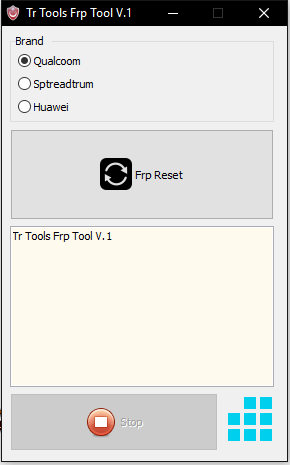
Download TR FRP Remove Tool V1.0 For Qualcomm , Spreadtrum & Huawei


Download TR FRP Remove Tool V1.0 For Qualcomm , Spreadtrum & Huawei


Download TR FRP Remove Tool V1.0 is a small application for windows computer, which allows you to remove the Spreadtrum Qualcomm And Huawei FRP. Please read the following terms and conditions carefully before using TRFRP Unlocker,  Use of this software indicates you accept the terms of this license agreement and warranty. Its latest version is released and 
border-bottom: 1px solid rgb(27 , 142 , 222); box-sizing: border-box; color: rgb(27 , 142 , 222); cursor: pointer; display: inline; float: none; font-family: "lato"; padding: 0px 0px 1px; position: static;">available for direct download from our website. If you are interested in to download the latest TR FRP Unlocker, then simply follow the link given at the bottom. It is free to download and very easy to use. So download and enjoy the new Spreadtrum FRP Unlocker, Xiaomi MI Account Unlocker on your PC.


How to Use: Here is the tutorial about, how you can remove TR FRP Tool on fastboot mode using the TR FRP Unlocker, Qualcomm FRP tool. Remove Android FRP without using any box, use the simple fastboot tool to remove FRP lock on Android smartphones. The Factory Reset Protection remove fastboot tool is very useful for mobile repair shop on an individual who wants to Hard Reset or FRP reset on Android devices. This tool is working on many Android devices to remove FRP or Hard Reset, Some of the models will not support in this FRP remove software or tool, So please follow the below steps one by one according to your phone’s model and CPU,


License: TR FRP Tool is freeware Utility Tool. You may try it free for always.


Download Link


icloud can be unlocked or not ?


icloud can be unlocked or not ? 


This is not an advice for people who have stolen an iPhone but for the ones that bought a stolen one from an online eshop (without knowing it) an the iCloud Activation Lock is enabled.
  1. First of all you should always check the IMEI number of a used iPhone before you buy it with an iPhone IMEI Check Service by proven and legitimate providers like UnlockSpector.
  2. The best way to get iPhone iCloud Lock removed is by contacting the original owner of that iPhone. The problem is that in most cases, the seller of a second-hand iPhone from an e-shop usually isn’t the original iPhone owner. You can use services that have access to Apple’s iCloud databases. This allows you to get a report with all the contact information from the original owner. With that information you are able to contact the original owner, explain the situation, and ask him to remove the iCloud Lock of that iPhone. One of the most trustful and of cource legitimate provider of such services is iPhoneUnlock.Zone.
  3. Getting the contact information of the original owner is the safest, quickest and the only legal way to get the iCloud Activation Lock of your iPhone unlocked. If he refuses to unlock it you can now will be able to send a formal iCloud Removal request to Apple. (because you have the Apple ID of that iPhone)
  4. Finaly having the Apple ID of the original owner (The iCloud account in which the iPhone is locked to), can help you to remove the iCloud Lock by submitting it to an iCloud Activation Screen Removal service, again by iPhoneUnlock.Zone.


This should be marked as duplicate, but ill answer it anyway.
It can easily be broken if:
  1. It is an iPhone 3GS, 4, iPad 1 or iPod Touch 3G, 4G
  2. You bought the phone legitimately
  3. You stole the phone like a little scumbag(this isn't a means of breaking it, but I address this point)


Too address these:
  1. You can remove the iCloud lock on these phones as they are old enough to do so. I'm not going to say how, because of security concerns, if you have these devices you should upgrade anyway.
  2. You can now ring up Apple, and if you have proof of purchase, they will unlock the iCloud lock.
  3. If you don't have any of these and you stole them, then you should be ashamed and return it to the authorities anonymously, you won't get much resale anyway and it will look stolen.
  4. There is another way to remove these, but I don't want to discuss it because it goes against Apple guidelines, and just buy them seriously, if you are that poor you cannot afford one, then steal Android phones. However this way does exist, but unlike the other way it is illegal/Apple and I don't want you to.
  5. Oh, people are saying get in touch with the person you bought it from, but I'm assuming that you either got it from an insurance company, or like that for cheap. They really should have factory reset it for you on sale, and if they didn't to try and get in touch. Sometimes this is not possible, which is why I think you have asked this question.

How to Unlock iCloud Locked iPhone 7 (Plus)/ 6s (Plus)/6s/6 (Plus)/6/5s/5c/5


How to Unlock iCloud Locked iPhone 7 (Plus)/ 6s (Plus)/6s/6 (Plus)/6/5s/5c/5


SUMMARY: If your iPhone has an iCloud account lock on it, it means that regardless of how much you paid for your second-hand phone, the previous owner can still block you from using it. They can do this by keeping the iPhone locked to their iCloud account and not allowing you to log into the phone.


The only way around this is to get an iCloudaccount unlock. It frees your iPhone from the previous owner’s iCloud account and allows you to setup your iCloud account on that phone, meaning you can start making calls, sending messages, and using apps.
Of the 9 iCloud activation unlock services we found tested, the fastest, cheapest, and best supported iCloud unlock provider is iPhone IMEI. They unlocked all 6 iCloud accounts we sent them, for the least money, and did it in the fastest time.


You bought a second hand iPhone for less than half the market value, and you were really happy about your purchase. But then you try to operate it and you are asked for an Apple ID and password.
Can you identify with the above given situation? It doesn't have to be exactly like that, maybe you were given an iPhone as a gift by someone, or maybe you just accidentally got your iPhone iCloud locked. If you are using an iCloud locked iPhone, your primary concern should be how to unlock iCloud locked iPhone. You should be careful about the techniques you use to unlock iCloud locked iPhone, there are a lot of companies and softwares out there that promise results but don’t deliver.
In this article, we’ll discuss the different safe iCloud removal methods by which to unlock iCloud locked iPhone. So read on if you have an iCloud locked iPhone with you!


Part 1: Basic information about iCloud lock

What does iCloud lock mean?

Part of the normal process of setting up a new iPhone is to register the phone to an Apple ID. Each phone has a unique number, an IMEI. Also, to fully use the services offered by Apple each user needs to have an Apple ID, that is an iTunes account. When setting up a new phone, you should enable ‘Find My iPhone’. When you do that the unique details are logged to the Apple account and the phone is referred to as being iCloud locked. Your account details are linked to the iPhone and stored on Apple’s servers, they are therefore iCloud locked. If you do not know the details of the account, the email and password used to originally register the new phone, it is a problem, and you may find it useful to know how to bypass iCloud activation lock.

What does this mean for you?

If you have an iCloud locked iPhone, which you do not know the account details for, you can still use it. There are a lot of websites that will tell you that you cannot use it at all but you can still use it as long as the phone isn’t passcode protected. However, you cannot turn off Find My iPhone on the device, you cannot erase the device, and you cannot reactivate the phone to set it up with your details. Most significantly, if the phone is connected to the internet, it is traceable, and the person whose account it is registered to can, at any time, wipe the phone clean and lock you out of it in any way at all. The iPhone really is not much use then, unless you can find a way to unlock iCloud activation.
Now that you know everything you need to know about an iCloud locked iPhone, read on to find out how to unlock iCloud locked iPhone.

Part 1: How to unlock iCloud locked iPhone (Quick Solution)

Below you’ll find the quickest possible solution to bypass iCloud activation. So read on to find out how to unlock iCloud locked iPhone using the quick method:
Step 1: Go to Settings > Wi-Fi. Click on the ‘i’ next to the WiFi network you want to connect to.
Step 2: Remove the DNS settings and enter a new one according to your location:
  • • USA/North America: 104.154.51.7
  • • Europe: 104.155.28.90
  • • Asia: 104.155.220.58
  • • Other areas: 78.109.17.60
Step 3: Tap ‘Back’, and then go to ‘Activation Help.’
Once the bypass is complete, you’ll get a message saying "You have successfully connected to my Server.” Now you have successfully been able to unlock iCloud locked iPhone. However, you should know that while this is a quick fix solution, it isn’t a permanent one. If you want a permanent means by which to unlock iCloud locked iPhone, read the next part.


Part 2: How to unlock iCloud locked iPhone (Permanent Solution)

Step 1: Go to Menu > Applications > Crash. Your iPhone will restart now.
Step 2: Select the language and country. Now choose the WiFi settings.
Step 3: Select the ‘i’ option next to the relevant WiFi network. Scroll down and tap on the Menu under "HTTP PROXY”.
Step 4: In the Server, list out 30 emoji icons.
Step 5: In the Port Zone, list out 15-30 random characters.
Step 6: You’ll repeatedly be met with the language and Unlock screen. Repeatedly slide the Unlock screen and tap the language options until you enter the Home screen.
After you’ve been able to unlock iCloud locked iPhone, you can go back to using iPhone nor-mally. However, you should know that while this is a permanent solution, it is far from ideal. This is because every time you use apps like Face Time, or Phone, you’ll have to perform the iCloud activation unlock yet again.


Part 3: How to unlock iCloud locked iPhone (Free Solution)

If you’re the original user of the iPhone, and you think it’s unfair to shell out extra money to un-lock an iPhone that should already be unlocked, then you can visit the Apple store. You may have forgotten your iCloud details which include your Apple ID or your password. To get your details back, you can visit Apple store and follow the steps to retrieve your details. If you bought an iPhone from a seller, endeavor to ask them if it’s a second-hand iPhone and get the right de-tails from the user.
This might seem like an easy solution, however it is actually quite difficult and time consuming. Apple is extremely difficult about its security, as such you’ll have to be the original owner of the iPhone and you’ll need to have all your ownership details if you want to be able to carry out this method. You can try to go about this method, but chances are strong that you’ll give up soon, in which case you should revisit some of the methods mentioned earlier.
As you can see, there are really a lot of options with which to unlock iCloud locked iPhone. There is a quick method, which is temporary. There is a permanent method, which harms func-tionality. There is a simple and fast solution using OfficialiPhoneUnlock, however for this you have to spend a nominal amount for the unlock. Finally, there’s also the free method, but that is extremely complicated.
You can feel free to choose the method which is most suitable for you, but my personal recom-mendation is that you use OfficialiPhoneUnlock, because in that case a third-party takes over the unlock process and all you have to do is wait a while. However, whatever you choose, do let us know down in the comments section. We’d love to hear from you!


This should be marked as duplicate, but ill answer it anyway.
It can easily be broken if:
  1. It is an iPhone 3GS, 4, iPad 1 or iPod Touch 3G, 4G
  2. You bought the phone legitimately
  3. You stole the phone like a little scumbag(this isn't a means of breaking it, but I address this point)


Too address these:
  1. You can remove the iCloud lock on these phones as they are old enough to do so. I'm not going to say how, because of security concerns, if you have these devices you should upgrade anyway.
  2. You can now ring up Apple, and if you have proof of purchase, they will unlock the iCloud lock.
  3. If you don't have any of these and you stole them, then you should be ashamed and return it to the authorities anonymously, you won't get much resale anyway and it will look stolen.
  4. There is another way to remove these, but I don't want to discuss it because it goes against Apple guidelines, and just buy them seriously, if you are that poor you cannot afford one, then steal Android phones. However this way does exist, but unlike the other way it is illegal/Apple and I don't want you to.
  5. Oh, people are saying get in touch with the person you bought it from, but I'm assuming that you either got it from an insurance company, or like that for cheap. They really should have factory reset it for you on sale, and if they didn't to try and get in touch. Sometimes this is not possible, which is why I think you have asked this question.


Sunday, 6 August 2017

DOWNLOAD MOBILE (CPU) USB FLASHING DRIVER


DOWNLOAD MOBILE (CPU) USB FLASHING DRIVER


MEDIATEK CPU DRIVER 


HERE IS USB DRIVERS FOR ALL MTK MOBILE PHONE. 


READ :  HOW TO INSTALL PROPERLY MTK DRIVER 
DIRECT INSTALL NO NEED TO INSTALL MANUALLY 


8s; vertical-align: baseline;">
DOWNLOAD FOR WINDOWASIA TELECOM 


THIS DRIVER NEEDED TO DO MANUAL UPDATE VIA PC ( DEVICE MANAGER ) 
;">
DOWNLOAD FOR WINDOWASIA TELECOM 


SPREADTRUM CPU DRIVER 

HERE IS USB DRIVERS FOR ALL SPD MOBILE PHONE. 


READ :  HOW TO INSTALL PROPERLY SPD DRIVER 
DIRECT INSTALL NO NEED TO INSTALL MANUALLY 

vertical-align: baseline;">
DOWNLOAD FOR WINDOWASIA TELECOM 


THIS DRIVER NEEDED TO DO MANUAL UPDATE VIA PC
2SERIAL_by_Asia_Telecom.zip" rel="20" style="border: 0px; color: black; display: block; float: none; font-family: inherit; font-style: inherit; font-weight: inherit; line-height: normal; margin: 0px 5px 0px 0px; outline: 0px; padding: 0px; text-align: center; vertical-align: baseline;" title=" Samsung Galaxy S USB Driver for Windows x86">DOWNLOAD FOR WINDOWASIA TELECOM 

case; vertical-align: baseline;">

QUALCOMM CPU DRIVER 


HERE IS USB DRIVERS FOR ALL QUALCOMM MOBILE PHONE. 
READ :  HOW TO INSTALL PROPERLY QUALCOMM DRIVER 
 DIRECT INSTALL NO NEED TO INSTALL MANUALLY (.EXE)
DOWNLOAD FOR WINDOWASIA TELECOM 


SAMSUNG CPU DRIVER


HERE IS USB DRIVERS FOR ALL SAMSUNG MOBILE PHONE. 


READ :  HOW TO INSTALL PROPERLY SAMSUNG DRIVER 
 DIRECT INSTALL NO NEED TO INSTALL MANUALLY (.EXE)

t-family: inherit; font-style: inherit; margin: 0px; min-height: 30px; outline: 0px; padding: 2px 0px 0px 40px; vertical-align: middle;"> DOWNLOAD FOR WINDOWASIA TELECOM 


This driver needed to do manual update via Pc


COOLSAND CPU DRIVER 


Here is USB Drivers for All Coolsand Mobile Phone. 
Read :  How to Install Properly Coolsand Driver 
 Direct Install No Need to install Manually 
: 0px; margin: 0px; outline: 0px; padding: 0px; vertical-align: baseline;">
Download For WindowAsia Telecom 


NOKIA CPU DRIVER 


Here is USB Drivers for All Nokia Mobile Phone. 
Read :  How to Install Properly Nokia  Driver 


 Direct Install No Need to install Manually 
ground-position: 2px center; background-repeat: no-repeat; border: 0px; font-family: inherit; font-style: inherit; margin: 0px; min-height: 30px; outline: 0px; padding: 2px 0px 0px 40px; vertical-align: middle;"> Download For WindowAsia Telecom 
This driver needed to do m anual update via Pc

Monday, 31 July 2017

How To Flash ALL Nokia With Infinity Best ( Cra-ck Version )

How To Flash ALL Nokia With Infinity Best ( Cra-ck Version )


Also, download and install the Infinity Best software which is the key in this process. Once you have taken care of all these things, we can move forward with the flashing process of your Nokia Asha with Infinity Best.


Step-by-Step Guide to Flash Nokia Asha with Infinity Best.

Here is a step-by-step guide to teach you how to flash Nokia Asha 503 with Infinity Best.

Note: There are chances of phone going dead during the process so make sure that you don't do anything else than this guide.

1. Connect your phone to the computer and make sure that you have installed the Infinity Best.
2. Also, make sure that you have the flashing files required for the purpose.
3. Open the software and in the service tool, select the RM model of your phone.
4. Check the 'Manual' box at the top of software.
5. Now start adding all the flashing files manually which are MCU, PPM1, and CNT1. Leave all other boxes empty.
6. Now see the 'Flash' button below them and click it to start the flashing process.
7. Once the flashing process is done, restart your phone.
8. You have successfully flashed your Nokia Asha 503.

I really hope that this article helped you. Don't forget to leave us your feedback in the comments section below and ask any question about the guide. Keep visiting our website for more tech guides.


con you pc then you atf flashing software is require to an update. You can update or download atf flashing box full setup installer by clicking on the given downloading link. Follow the below official download link to download or update ATF flasher software now.

Download ATF  Box Flasher Setup Version v12.60Download ATF Box Flasher USB Driver


Thus Articles ATF Box Advance Turbo Flasher Update V12.60 Crack Setup With USB DRIVER Free Download For Windows

A few information about the ATF Box Advance Turbo Flasher Update V12.60 Crack Setup With USB DRIVER Free Download For Windows, hopefully can provide benefits to all of you who have been to complete this super blog.

You've finished reading an article ATF Box Advance Turbo Flasher Update V12.60 Crack Setup With USB DRIVER Free Download For Windows and the link of this article is https://pinkberrylicious.blogspot.in/2016/09/atf-box-advance-turbo-flasher-update.html Hopefully this article this could provide more knowledge for you. Thank you for visiting our blog and do not forget to look for other information on the blog 
test


Copyright @ 2015